How to Send Birthday Invites in Under 5 Minutes (Mobile-Friendly Guide)
May 20, 2026
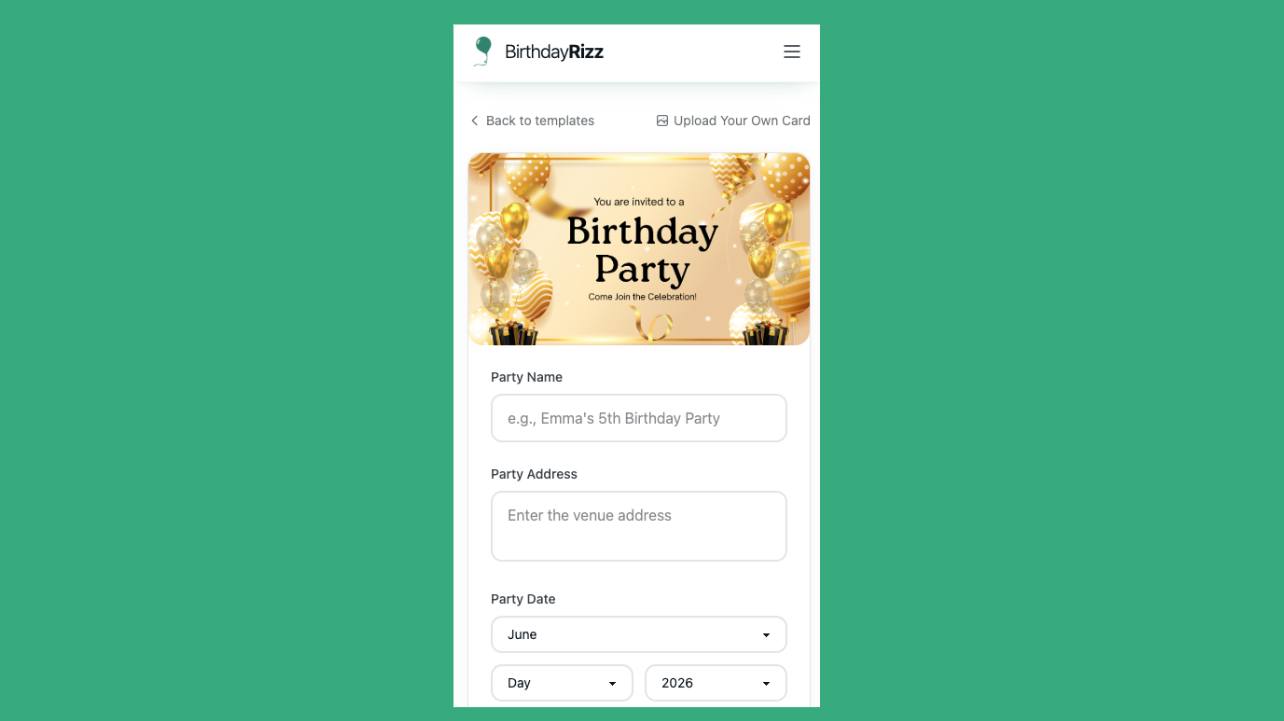
Planning a birthday party should be fun — not stressful. The last thing you need is spending hours designing, printing, and mailing invitations that might get lost in the mail or ignored. That’s why thousands of hosts are switching to digital birthday invitations sent via SMS and email.
At Birthday Rizz, you can create and send professional-looking invites in under 5 minutes — straight from your phone. No apps to download, no learning curve, and best of all: invites for 10 or fewer guests are completely free.
In this step-by-step guide, we’ll show you exactly how to send birthday invites faster than it takes to make a cup of coffee.
Why Digital Birthday Invitations Are a Game-Changer in 2026
- 95%+ open rates on SMS vs ~20-30% for traditional email or paper invites
- Instant delivery — guests get the invite the second you hit send
- Real-time RSVP tracking in your dashboard
- Automatic party reminders so no one forgets
- Zero paper waste and zero postage costs
Whether it’s a kids’ birthday, milestone celebration, or last-minute backyard bash, digital invites save time and actually get responses.
What You’ll Need Before Starting (30 seconds)
- Your phone (iOS or Android — works perfectly on mobile)
- Guest phone numbers or email addresses
- A photo or design for your invite (optional)
- Event details: date, time, location, and a fun message
That’s it. Let’s dive in.
Step 1: Add Event Details (Under 90 Seconds)
Head to BirthdayRizz.com on your mobile browser and click “Create Invitation”.
You’ll see a clean, mobile-optimized form:
- Birthday Name: “Emma’s 7th Birthday Bash” or “John Turns 40!”
- Date & Time
- Location (address or “Our Backyard – Link to Google Maps”)
- Host Message: Add a personal note like “Can’t wait to celebrate with you!”
Pro Tip: Keep the message short and exciting. Guests read SMS on the go.
Choose your card design:
- Pick from professionally selected birthday cards with catchy festive phrases
- Or upload your own custom design with a photo (perfect if you made it in Canva or hired a designer)
No design editor needed — just upload and go.
Step 2: Add Guests (60–90 Seconds)
This is where Birthday Rizz shines.
- Paste phone numbers for SMS delivery (highest response rates)
- Add emails for guests who prefer that
- Mix and match — some get text, some get email
You can import from contacts or type them manually. For 10 or fewer guests? Completely free.
Smart Feature: You can add more guests later — even after sending the original invites. No need to create a new invitation.
Step 3: Review & Send (Under 30 Seconds)
Preview how the invite looks on mobile (both SMS preview and email version).
Hit Send — invitations go out instantly. No scheduling delays.
Your guests will receive a beautiful, mobile-friendly invitation with:
- All event details
- RSVP buttons (Yes / No / Maybe)
- Your uploaded photo or chosen design
- Easy “Add to Calendar” option
After Sending: Track Everything in Real Time
Log into your Birthday Rizz dashboard to watch RSVPs roll in:
- Live count of Yes/No/Maybe
- Individual responses with names
- Push notifications when someone replies
- Automatic reminders sent 1 day before the party to everyone who RSVP’d yes or pending RSVP.
- Automatic reminders to guests that have not RSVP’d yet (this feature omits those who responded with either Yes or No - so no annoying unnecessary notifications). Need to update the location or add a note about bringing swimsuits? Edit the event and changes push to all guests automatically.
Real Host Stories
“I planned my daughter’s 5th birthday in the carpool line while waiting. Sent invites during her nap and had 18 RSVPs by dinner.” – Sarah M., Austin TX
“Saved over $120 compared to Evite for my 50-guest 40th. Same price up to 100 guests and no subscriptions.” – Marcus T., Chicago
Pricing That Actually Makes Sense
- 0–10 guests: Free
- 11+ guests: Lowest price on the market (competitors charge 2–3x more, some up to $65)
- Flat rate up to 100 guests
- No ads. No subscriptions. No hidden fees.
Common Questions About Sending Digital Birthday Invites
Can I send last-minute invites?
Yes! Same-day delivery works great. Guests get the SMS instantly and can RSVP on the spot.
What if I don’t have a design?
Choose from our curated collection of beautiful, ready-to-send birthday cards with festive wording.
Do guests need the app?
No. They just tap the link in the SMS or email. Works on any phone.
Is it private?
Yes — only people you invite can see the event details.
Pro Tips for Maximum RSVPs
- Send invites 2–3 weeks in advance for bigger parties
- Use SMS for at least 70% of guests (way higher response)
- Include a fun photo — personal invites get 40% more replies
- Add a clear “What to bring” note in the host message
- Follow up non-responders directly from the dashboard
Ready to Send Your Birthday Invites in Under 5 Minutes?
Stop stressing over invitations and start focusing on the fun parts of party planning.
👉 Create Your Free Birthday Invitation Now
It takes less than 5 minutes on mobile. Your guests will thank you for making it so easy to celebrate with you. 🎂
Also Read About: How To Write “No Gifts” On A Birthday Invitation